3. Catch regressions
Goal: compare a candidate run with a saved baseline and stop automation when metrics get worse. Before you start: install the starter kit using recipe 1. These commands run without a model.
A regression is a measured result becoming worse than the baseline beyond the comparison tolerance. The comparator checks individual metrics, not only the weighted overall score.
A regression test in plain words
Think of two exam results. The baseline is the report of a run you trust. The
candidate is the report of a new run, after you changed a model, a prompt or a
chunk size. rag-titan compares the two metric by metric. If any metric got worse
by more than a small tolerance, that is a regression, and with
--fail-on-regression the command exits with code 1 instead of 0.
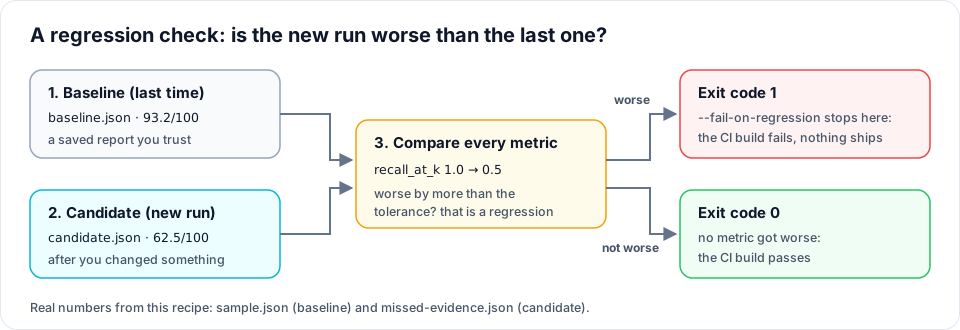
Why the exit code matters: CI systems such as GitHub Actions treat exit code 1 as a failed step, so a worse RAG cannot be merged by accident.
What you will see
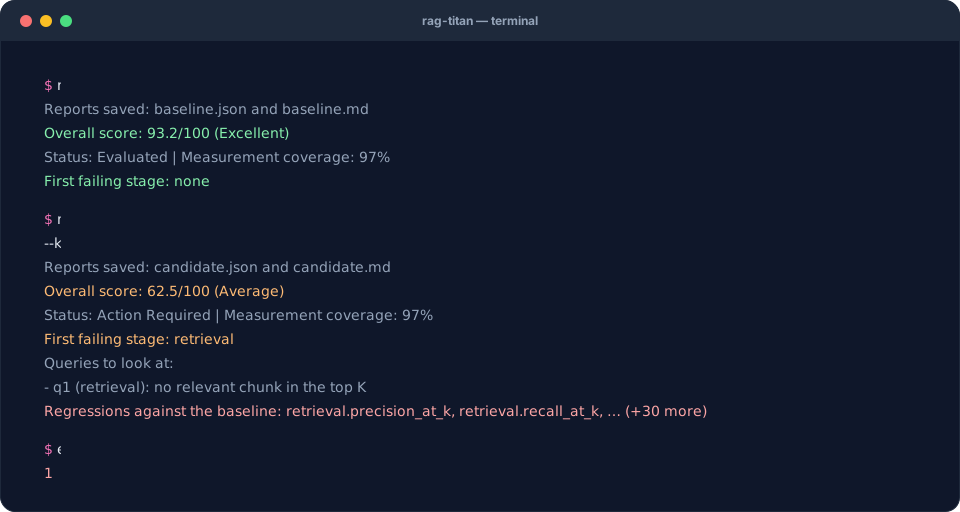
The terminal replays the real output of this recipe's commands on the starter data.
1. Save the known baseline
rag-titan evaluate --input sample.json --output baseline.json --k 3
Keep this report. A baseline is a report, not the original sample.json data.
Use a separate output filename for each candidate so you do not overwrite it.
2. Prove that an unchanged run passes
rag-titan evaluate --input sample.json --output unchanged.json --baseline baseline.json --k 3 --fail-on-regression
The summary ends with:
Regressions against the baseline: none
The process exits with code 0, meaning this comparison passed.
3. Compare the broken candidate
Enable JavaScript to customize the comparison, or use the command below.
rag-titan evaluate --input missed-evidence.json --output candidate.json --baseline baseline.json --k 3 --fail-on-regression
The report lists regressions including retrieval.recall_at_k. The process exits
with code 1. This failure is intentional: the candidate misses the leave-policy
evidence. Both candidate.json and candidate.md are saved before the process exits,
so you can inspect what happened.
Immediately after that command, inspect its exit code:
echo $?
$LASTEXITCODE
Expected: 1. Check it immediately; a later command can replace the saved exit code.
Remove --fail-on-regression when you want a report without deliberately failing
the command. Without that flag, regressions are still listed.
4. Read exactly what changed
Save this as compare_reports.py in the starter folder:
import json
from pathlib import Path

from rag_titan.evaluation import ReportManager

baseline = json.loads(Path("baseline.json").read_text(encoding="utf-8"))
candidate = json.loads(Path("candidate.json").read_text(encoding="utf-8"))

for change in ReportManager().regressions(candidate, baseline):
    print(f"{change['metric']}: {change['baseline']:.3f} -> {change['current']:.3f}")
Run it:
python compare_reports.py
You will see retrieval.recall_at_k: 1.000 -> 0.500, among other changes. A lower
latency is better; a lower recall is worse. The package uses each metric's scoring
policy to choose its direction.
5. Use the same command in automation
After your pipeline produces a new candidate-data.json, run:
rag-titan evaluate --input candidate-data.json --output candidate-report.json --baseline baseline.json --k 3 --fail-on-regression
A CI job that respects non-zero exit codes will fail when the comparison fails.
Retain the JSON and Markdown reports as artifacts, including on failure. Do not
append || true, because that hides the failing exit code.
Before relying on this gate:
- Use the same questions, gold labels, K, scoring policy and package version.
- Check that the new data has all expected queries, stages and labels. Missing metrics are not automatically regressions: only comparable numeric measurements present in both reports are checked.
- Review noisy latency or cost changes across repeated live runs. The CLI uses the default tolerance: 0.02 absolute for quality metrics, 2% relative for cost and tokens. Timings jitter between runs, so a latency only counts as worse when it is more than 10% and more than 5 ms slower (7.2 ms → 7.55 ms is noise).
- Inspect reranking gain metrics in context: improving retrieval can leave less improvement for the reranker and reduce its measured gain.
- Promote a new baseline only after reviewing its failures and coverage.
The Python API accepts a custom tolerance:
changes = ReportManager().regressions(candidate, baseline, tolerance=0.05)
This is 0.05 absolute for quality metrics and 5% relative for telemetry;
it is not a universal “five percent score drop” rule. To count every slower
timing, also pass latency_share=0, latency_min_ms=0.
Next: bring logs from another RAG, or collect a live rag-titan run.