Command line
Installing the package adds a rag-titan command. python -m rag_titan runs the
same tool with the same options; use it on Windows when security settings block the
rag-titan.exe launcher, see Getting started.
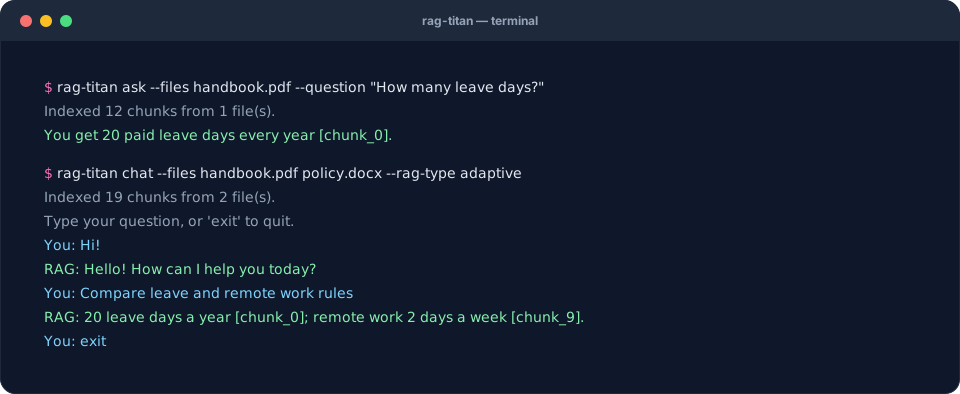
Ask one question
rag-titan ask --files handbook.pdf --question "How many leave days do I get?"
Chat in a loop
rag-titan chat --files handbook.pdf policy.docx --rag-type adaptive
Type exit to quit.
See every step
rag-titan ask --files handbook.pdf --question "How many leave days do I get?" --trace
Prints every step the RAG type took (search results with their files and scores, evidence checks, rewrites) before the answer.
Evaluate and compare
rag-titan evaluate --files docs/*.md --questions questions.json \
    --rag-type simple adaptive --chunker word paragraph
Runs every RAG type with every chunker on your test questions and prints a
report, then the questions that missed evidence or got no answer. Add
--retrieval-only to score search alone (fast, no LLM). See
Evaluating RAG.
Evaluate logged data
rag-titan evaluate --input data.json --output report.json --k 5 \
    --baseline last_report.json --fail-on-regression
Scores the logged outputs of any RAG system, stage by stage: chunking,
embedding, retrieval, reranking, context, answers and end to end. It saves
report.json and report.md and prints the overall score. With --baseline
it lists the metrics that got worse, and --fail-on-regression then exits
with code 1, for scheduled runs. No model is needed. See
Evaluating every stage.
Write golden questions
rag-titan golden --questions questions.txt --files policy.md --output golden.json
Writes a first draft of your golden questions: one record per question (one per
line in questions.txt, or a JSON list), with a suggested evidence sentence from
your files. Every record starts with "validated": false: you review it, write the
expected answer, then mark it validated. It never overwrites an existing file unless
you add --force. See Build a golden set.
Options
| Option | Used by | Meaning |
|---|---|---|
--files |
ask, chat, evaluate | PDF, DOCX, MD or TXT files (required, except with --input) |
--rag-type |
ask, chat, evaluate | simple (default) or adaptive; evaluate takes several |
--log-level |
ask, chat, evaluate | DEBUG, INFO or WARNING (default) |
--question |
ask | the question to answer (required) |
--trace |
ask | also print every step taken |
--questions |
evaluate | questions JSON file (required with --files) |
--chunker |
evaluate | one or more chunkers to compare |
--chunk-size, --chunk-overlap |
evaluate | used by every setup |
--retrieval-only |
evaluate | score search only, no LLM |
--top-k |
evaluate | chunks per search with --retrieval-only (default 5) |
--input |
evaluate | JSON data file to score, instead of --files and --questions |
--output |
evaluate | JSON report path with --input (default rag_report.json); a .md is saved next to it |
--k |
evaluate | results scored per query with --input (default 5) |
--baseline |
evaluate | an earlier JSON report: list what got worse |
--fail-on-regression |
evaluate | exit with code 1 when a metric got worse than the baseline |
--questions |
golden | questions, one per line (.txt) or a JSON list (required) |
--files |
golden | your documents, to suggest evidence quotes |
--output |
golden | where to write the template (default golden.json) |
--force |
golden | overwrite --output if it exists |
--version |
– | print the version |
The CLI also reads your .env file, see Configuration.