4. Evaluate your own RAG
Goal: evaluate outputs from your existing RAG, regardless of its framework, model or vector database. Requirements: the installation from recipe 1 and access to your system's logged outputs. Evaluation itself does not need access to the model or database.
What you will see
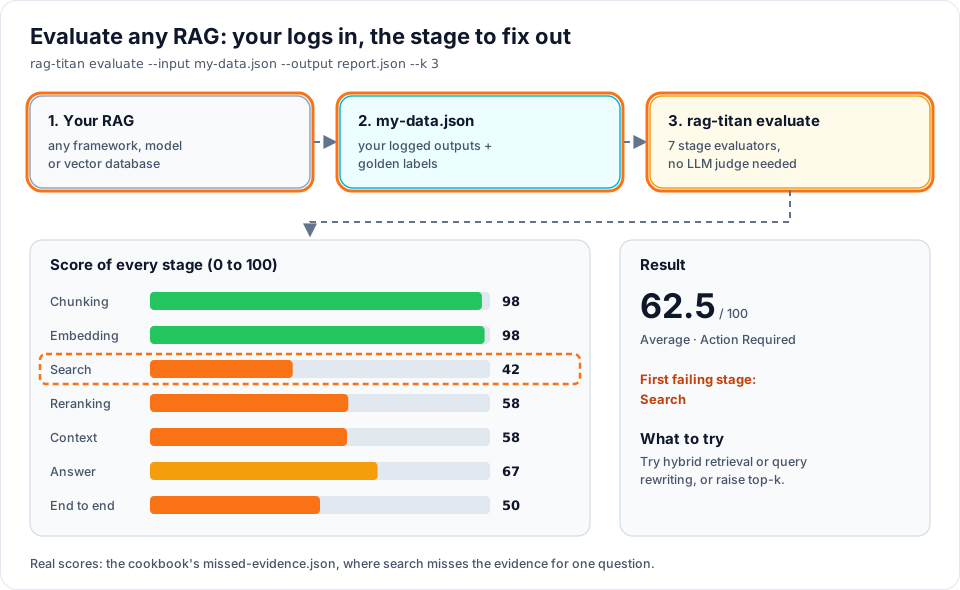
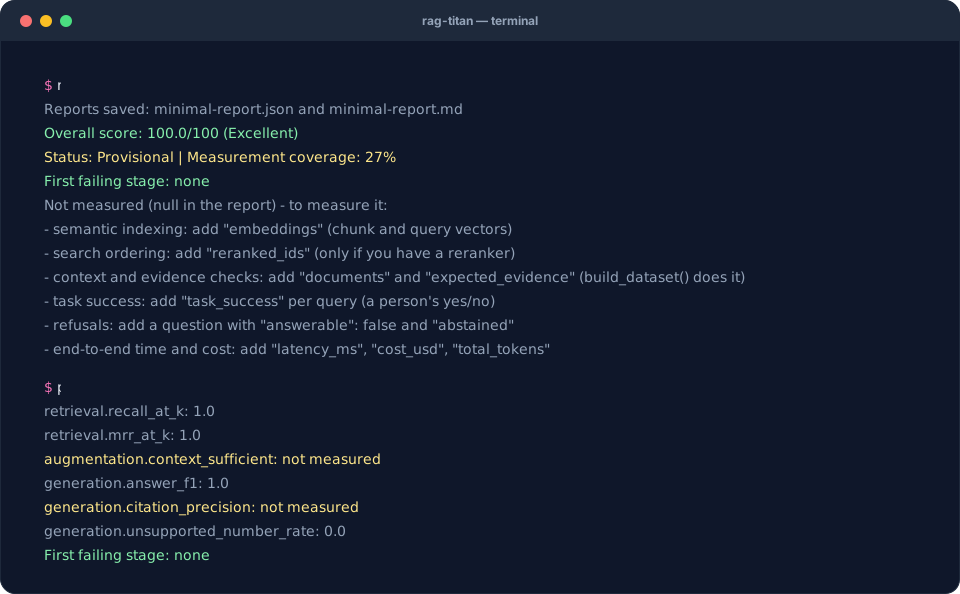
The terminal replays the real output of this recipe's commands on the starter data.
1. Start with the smallest useful dataset
Download minimal.json, or save the following as
minimal.json in your working folder. This is the complete runnable file:
{
  "chunks": [
    {"id": "c1", "text": "Employees get 25 days of annual leave."}
  ],
  "queries": [
    {
      "id": "q1",
      "expected_chunk_ids": ["c1"],
      "retrieved_ids": ["c1"],
      "context_ids": ["c1"],
      "answer": "Employees get 25 days of annual leave.",
      "expected_answer": "Employees get 25 days of annual leave."
    }
  ]
}
rag-titan evaluate --input minimal.json --output minimal-report.json --k 1
python inspect_report.py minimal-report.json
inspect_report.py comes with the starter kit;
it is not part of the pip package. Without it, open minimal-report.md instead.
Retrieval recall and answer F1 are 1.0. Citation precision is not measured because this file does not provide citations. Expect a provisional overall report: there is much less measurement coverage than in the full starter example.
2. Map your actual logs
| Your system records | Evaluation key | Important detail |
|---|---|---|
| Every relevant indexed passage | chunks with id and text |
Include gold chunks even if retrieval missed them |
| A stable question identifier | queries[].id |
Unique per query; use the same IDs across comparisons |
| Search results in ranked order | retrieved_ids |
Highest-ranked first, before reranking |
| Reranker output in ranked order | reranked_ids |
Omit if there is no reranker |
| Chunks actually put into the prompt | context_ids |
These may differ from search results |
| The actual generated text | answer |
Do not replace it with your ideal answer |
| Human-reviewed reference answer | expected_answer |
Supplies the target for answer metrics |
| Relevant chunk IDs | expected_chunk_ids |
These are gold labels, not copied search results |
| Actual citation IDs / desired IDs | citations / expected_citations |
Use IDs matching the chunks |
| Stage durations | retrieval_latency_ms, generation_latency_ms |
Use milliseconds and the right stage |
| Total duration, cost and token usage | latency_ms, cost_usd, total_tokens |
Measure them; leave unknown values absent |
A retrieved ID is an observation; an expected ID is a label. Copying retrieved
IDs into expected_chunk_ids would make a failed search appear correct. Likewise,
verified_claims and task_success are supplied judgements, not judgements the
package magically generates.
3. Build the data file with build_dataset()
You do not have to write the conversion yourself. Rename your log fields to the keys
in the table above, then let build_dataset() join them with your
golden questions. Save this as make_data.py:
import json
from pathlib import Path

from rag_titan.evaluation import build_dataset

logs = json.loads(Path("my_rag_logs.json").read_text(encoding="utf-8"))

# one run per question: what YOUR RAG did, under rag-titan's names
runs = [{"question": run["question"],
         "retrieved_ids": run["hits"],
         "context_ids": run["hits"],
         "answer": run["answer"],
         "retrieval_latency_ms": run["search_ms"],
         "generation_latency_ms": run["llm_ms"]} for run in logs["runs"]]

data = build_dataset(
    chunks=logs["chunks"],                      # [{"id": "p1", "text": "..."}, ...]
    runs=runs,
    golden="golden.json",                       # reviewed: "validated": true
    documents={"travel_policy.md": Path("travel_policy.md").read_text(encoding="utf-8")},
)
Path("my-data.json").write_text(json.dumps(data, indent=2), encoding="utf-8")
python make_data.py
rag-titan evaluate --input my-data.json --output report.json --k 3
build_dataset() does the error-prone parts for you:
| It does | Why it matters |
|---|---|
| Finds where every chunk sits in its document | Context, evidence and coverage metrics need positions |
Copies expected_answer, required_facts, quotes from golden.json |
Labels come from a person, never from your RAG |
Works out expected_chunk_ids from the evidence quotes |
No hand-made id lists |
Turns markers like [p1] in the answer into citations |
The original stays in raw_answer |
| Refuses unreviewed golden questions and unknown keys | A typo or an unchecked label fails loudly |
On the travel-policy example from the new-user test, the same logs went from
32% to 59% measurement coverage with build_dataset(). The first failing stage
also became chunking: that RAG never indexed the document's title line, so 3 of
103 words are missing from every chunk. Only the document text can reveal that.
4. Evaluate from Python
Save this as evaluate_my_logs.py next to minimal.json:
import json
from pathlib import Path

from rag_titan.evaluation import RAGEvaluator, ReportManager
from rag_titan.evaluation.reports import summary_text

data = json.loads(Path("minimal.json").read_text(encoding="utf-8"))
report = RAGEvaluator(k=1).evaluate(**data)

manager = ReportManager()
manager.save_json(report, "my-report.json")
manager.save_markdown(report, "my-report.md")
print(summary_text(report))
python evaluate_my_logs.py
Replace the content of minimal.json with your real observations and independently
reviewed labels. To evaluate many questions, append records to queries; keep one
entry per unique chunk in chunks.
5. Add measurements gradually
You do not need to implement everything at once:
- Retrieval: chunk text, ranked IDs and expected IDs.
- Context and answers: actual context IDs, answers and reference answers.
- Citations: actual citation IDs and reviewed expected IDs.
- Chunking: source documents, character offsets and expected evidence.
- Embeddings: actual chunk/query vectors and index membership.
- Operations: stage latency, end-to-end latency, cost and token usage.
For multiple documents, use documents: {"handbook.md": "...", "expenses.md": "..."}
and a matching doc_id on each chunk. start and end are character offsets into
that document, with end excluded. Do not mix token indices with character offsets.
See the complete stage input format before adding these fields.
Keep missing data honest
Omit unavailable measurements instead of setting them to zero. A missing
reference answer should not be an empty reference string. A missing latency
should not be zero milliseconds. None/null in a report means “not measured”.
6. Why is a value null?
null never means zero and never means "no LLM": rag-titan uses no LLM judge at
all. A metric is null when its input is missing. The terminal summary lists what is
missing under Not measured; this table says what to add.
| Null in the report | Add this | You have it if... |
|---|---|---|
| Context precision/recall/sufficiency, token recall, evidence completeness, coverage | documents + chunk positions + expected_evidence |
You have the document text: build_dataset() adds all three |
| Semantic indexing, semantic cohesion | embeddings (chunk and query vectors) |
Your RAG embeds text: log the vectors |
| Search ordering (reranking) | reranked_ids |
You have a reranker; otherwise null is correct |
| Task success, claim support | task_success, verified_claims per query |
A person judged the answers |
| Abstention accuracy | A question with "answerable": false and abstained |
You test questions the documents cannot answer |
| End-to-end latency, cost, tokens | latency_ms, cost_usd, total_tokens |
Your logs record them |
| Size compliance, context budget | size_limits, max_context_tokens |
You have rules for chunk size or prompt size |
7. Generate a command for your files
Without JavaScript, use: rag-titan evaluate --input minimal.json --output my-report.json --k 3.
When evaluating a new run, save its input data as well as its report. That lets you reproduce a score without rerunning an expensive model and inspect individual failures later.
Next: prepare better gold labels and compare against a baseline.