Configuration
Settings are read from environment variables or a .env file in the
folder where you run your code. Every setting has a default, so nothing is required.
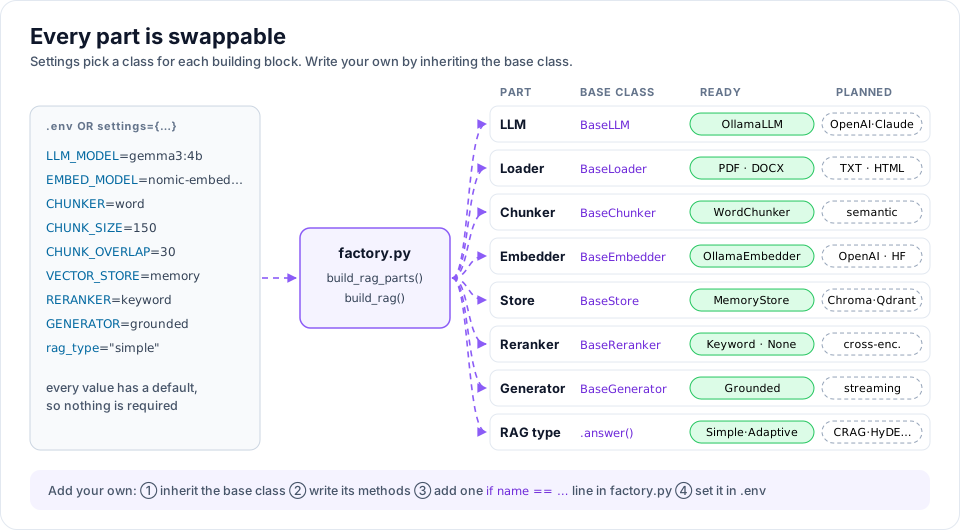
Copy the example file to start:
cp .env.example .env
All settings
| Variable | Settings key | Default | Meaning |
|---|---|---|---|
LLM_PROVIDER |
llm_provider |
ollama |
Who runs the chat model |
LLM_MODEL |
llm_model |
gemma3:4b |
Chat model for answers |
OLLAMA_HOST |
ollama_host |
http://localhost:11434 |
Ollama server address |
AGENT_MODEL |
agent_model |
qwen3:4b |
Model for agents (needs tools) |
AGENT_THINK |
agent_think |
true |
Turn on thinking for agents |
AGENT_MAX_STEPS |
agent_max_steps |
5 |
Max agent think/tool rounds |
EMBED_PROVIDER |
embed_provider |
ollama |
ollama, or hash (no model, see below) |
EMBED_MODEL |
embed_model |
nomic-embed-text |
Embedding model |
CHUNKER |
chunker |
word |
see Chunking methods |
CHUNK_SIZE |
chunk_size |
150 |
Units per chunk (see below) |
CHUNK_OVERLAP |
chunk_overlap |
30 |
Units shared by neighbouring chunks |
CHUNK_ENCODING |
chunk_encoding |
cl100k_base |
tiktoken encoding (token only) |
VECTOR_STORE |
vector_store |
memory |
Where vectors are stored |
DEDUPE_OVERLAP |
dedupe_overlap |
0.5 |
Drop near-copy search results; off keeps all |
RERANKER |
reranker |
keyword |
keyword or none |
GENERATOR |
generator |
grounded |
How answers are written |
LOG_LEVEL |
– | INFO |
Used by setup_logging() |
CHUNKER is one of word, character, token, recursive, sentence,
paragraph, heading or page. CHUNK_SIZE and CHUNK_OVERLAP count words
for word, model tokens for token, and characters for all the others. Change them together
when you switch: 150 words is roughly 200 tokens or 900 characters, so for
recursive, paragraph and heading try CHUNK_SIZE=1000, for sentence
500, and for page 2000. CHUNKER=token needs
pip install "rag-titan[tokens]"; to use your own tokenizer, see
Chunking methods.
Ollama Cloud
The same settings work with Ollama Cloud models.
Either keep using your local Ollama (run ollama signin once, then pick a
-cloud model), or talk to the cloud directly with an API key:
OLLAMA_HOST=https://ollama.com
OLLAMA_API_KEY=your-key          # sent for you as "Authorization: Bearer your-key"
LLM_MODEL=gpt-oss:20b-cloud
Cloud models need usage credits on your Ollama account; without them a request
fails with "Add usage credits or subscribe" (status 402). Keep EMBED_MODEL
on a local model if your plan has no cloud embeddings.
Without an embedding model
EMBED_PROVIDER=hash uses HashEmbedder: every word is hashed into a vector,
so no model is needed. Search then matches words, not meaning ("holiday"
does not find "leave"). It is meant for trying rag-titan offline, for tests and
for the browser playground, not for real documents.
Changing settings in code
Pass a dict. Your values win over the environment and the defaults.
from rag_titan import RAGTitan, get_settings

rag = RAGTitan(settings={"llm_model": "llama3.2", "chunk_size": 200})

settings = get_settings({"reranker": "none"})   # full settings dict
Logging
rag-titan prints nothing until you ask it to:
from rag_titan import setup_logging

setup_logging("DEBUG")   # DEBUG, INFO or WARNING