1. Your first evaluation
Goal: evaluate two handbook questions, save the results and explain three useful metrics. Requirements: Python 3.10 or newer and a terminal. Installation needs internet access; evaluating the bundled JSON does not need a model or network.
You will use rag-titan==0.8.4 so the expected numbers match this recipe.
What you will see
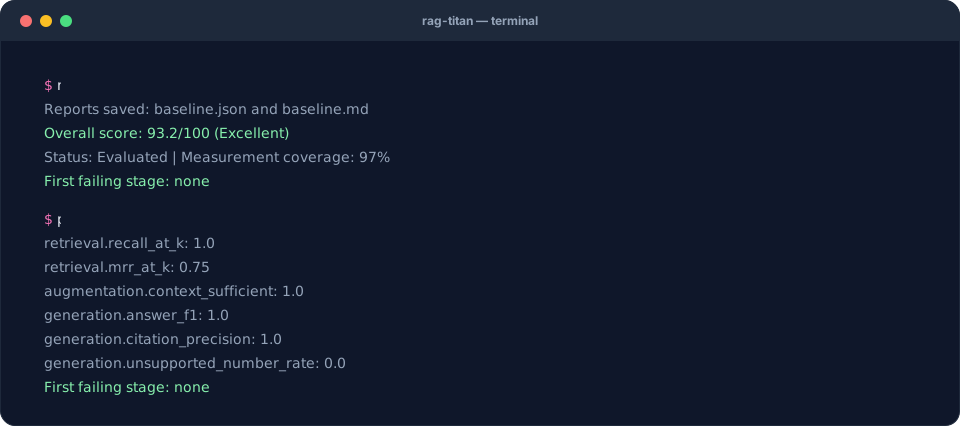
The terminal replays the real output of this recipe's commands on the starter data.
1. Set up a folder
Download the starter ZIP and extract it
with your file manager. Open a terminal inside the extracted rag-titan-cookbook
folder, the one containing sample.json. On macOS you can type cd, drag the
folder into Terminal, then press Enter. On Windows open the folder, type
powershell in File Explorer's address bar, and press Enter.
A terminal runs commands; a Python prompt starts with >>>. Paste the commands
below into the terminal, not the Python prompt. Do not copy any $ or > prompt
characters from other tutorials.
python3 --version
python3 -m venv .venv
source .venv/bin/activate
python -m pip install "rag-titan==0.8.4"
rag-titan --version
py --version
py -m venv .venv
.\.venv\Scripts\Activate.ps1
python -m pip install "rag-titan==0.8.4"
python -m rag_titan --version
On Windows, prefer python -m rag_titan over rag-titan: security settings
such as Smart App Control can block the rag-titan.exe launcher, and
python -m rag_titan takes exactly the same options.
If PowerShell blocks activation, you do not need to change its execution policy:
.\.venv\Scripts\python.exe -m pip install "rag-titan==0.8.4"
.\.venv\Scripts\python.exe -m rag_titan --version
In the rest of the cookbook, replace python with
.\.venv\Scripts\python.exe and rag-titan with
.\.venv\Scripts\python.exe -m rag_titan when running without activation.
Expected version output:
rag-titan 0.8.4
If Python is missing, install Python 3.10+ using the instructions in Getting started, then reopen the terminal. Keep this terminal open for the rest of the recipe. A new terminal needs the activation step again.
2. Meet the two questions
| Question | Correct answer | Evidence chunk |
|---|---|---|
| How many days of annual leave? | Employees get 25 days of annual leave. | c1 |
| How many remote-work days per week? | Remote work is allowed 3 days a week. | c4 |
Open sample.json in a text editor. It has:
chunks: document pieces, each with an ID and text.queries: logged retrieval, context, answers and the expected results.- Optional extra data: document spans, toy embeddings, timings and human labels.
For the first question, retrieval returns c2, c1, c3. The relevant chunk c1
is second. Reranking puts it first. The context includes it and the answer matches
the reference. The JSON is already logged data; evaluation does not ask a model
to answer the questions again.
3. Generate and run your command
Keep the defaults for the first run. The builder supports spaces and quotes in filenames and produces either Bash/zsh or PowerShell syntax.
Enable JavaScript for the command builder, or copy the command immediately below.
The default command, also usable without JavaScript:
rag-titan evaluate --input sample.json --output baseline.json --k 3
Expected terminal output:
Reports saved: baseline.json and baseline.md
Overall score: 93.2/100 (Excellent)
Status: Evaluated | Measurement coverage: 97%
First failing stage: none
Your checkpoint: baseline.json and baseline.md now exist next to sample.json.
The Markdown file is the readable report; open it in a text editor or Markdown
viewer. JSON is useful for scripts and future comparisons. The expected/ folder
contains reference JSON reports computed from the supplied data.
What K does
--k 3 scores the first three results already present in each logged ranking.
It does not change the retriever, call the model or create extra search results.
--top-k belongs to the separate --retrieval-only CLI mode; use --k here.
4. Read the important numbers
Run the included report reader:
python inspect_report.py baseline.json
For this sample you will see retrieval recall 1.0, MRR 0.75, answer F1 1.0 and citation precision 1.0.
| Result | Read it as | Avoid concluding |
|---|---|---|
| Recall@3 = 1.0 | Both questions found all their labelled evidence within three results | Every possible user question will work |
| MRR@3 = 0.75 | Correct evidence ranked second for q1 and first for q2: (1/2 + 1)/2 |
Search ordering is perfect |
| Answer F1 = 1.0 | Answer words match the reference words | A separate judge has verified every fact |
| Citation precision = 1.0 | Every cited ID is among the labelled expected citations | Each sentence is semantically supported |
| Coverage = 97% | Most weighted measurements are available | 97% of users got correct answers |
| Score = 93.2/100 | Weighted metrics summarize this small test set | The RAG is 93.2% likely to be correct |
The overall score is below 100 even though these headline metrics look good: it also includes ranking precision, context, chunk and other measurements. “No first failing stage” means none of the measured root-cause checks crossed its failure threshold. It is not a guarantee that no problem exists.
5. Make one visible change
Try scoring only the first retrieved result:
rag-titan evaluate --input sample.json --output top1.json --k 1
python inspect_report.py top1.json
Retrieval recall becomes 0.5: q1's correct chunk is at position 2, outside K=1. The logged context and answers have not changed, so answer F1 remains 1.0. This illustrates why you must distinguish “score fewer results” from “rerun the whole system with a different retrieval configuration.”
If something goes wrong
| What you see | What to do |
|---|---|
rag-titan: command not found |
Activate .venv, or use its full executable path as shown above |
Data file not found |
Open the terminal in the extracted folder; check that sample.json is there |
| Version is not 0.8.4 | Use the fresh virtual environment and pinned install command above |
not valid JSON |
Start with the unedited downloaded file; JSON uses double quotes and no trailing commas |
| Different scores | Check package version, input file and K; use the original teaching fixture |
| Ollama connection error | This recipe should not contact Ollama: use --input, not --files |
Next: diagnose a bad answer with two controlled failure cases.